
속성 부여 시스템
속성 시스템은 확률 기반 미니게임을 통해 아이템에 추가 능력치를 부여하는 구조이다.
성공과 실패가 명확히 분기되며, 속성 중복 여부와 최대 횟수를 고려해 결과가 적용된다.
전체 플레이 영상
구현 내용
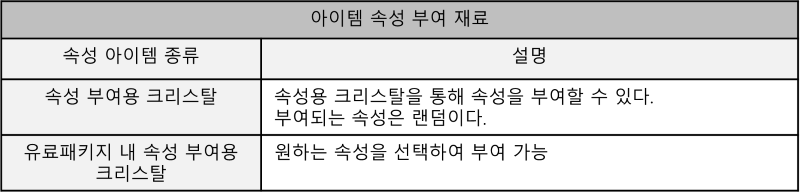
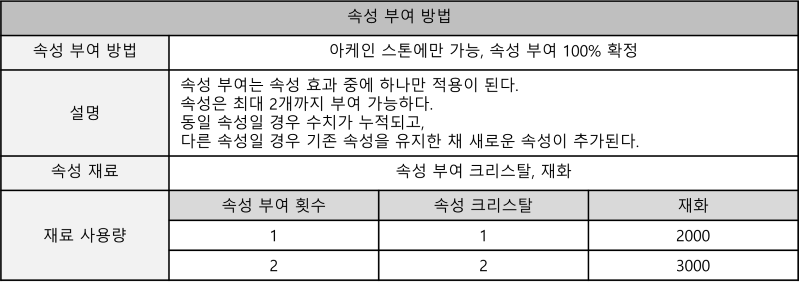


전체 코드
using System.Collections;
using System.Collections.Generic;
using System.Text.RegularExpressions;
using TMPro;
using UnityEngine;
using UnityEngine.UI;

public class PropertySystem : MonoBehaviour
{
    private const string CrystalItemId = "200_02_02";   // 속성 크리스탈 아이템 ID
    private const int MaxPropertyCount = 2;             // 최대 속성 추가 횟수

    [Header("아이템 슬롯")]
    public Image ringSlot;

    [Header("재료 및 재화")]
    public TextMeshProUGUI haveItemTxt; // 소지 크리스탈 수
    public TextMeshProUGUI needItemTxt; // 필요 크리스탈 수
    public TextMeshProUGUI needCoinTxt; // 필요 재화량

    [Header("경고")]
    public TextMeshProUGUI warningTxt;     // 재료 부족 경고
    public GameObject maxWarningTxt;       // 속성 최대치 초과 경고
    public GameObject upgradeMaxWarningTxt;

    [Header("미니게임 및 결과 패널")]
    public GameObject miniGame;         // 확률 미니게임 패널
    public TextMeshProUGUI upgradeInfoTxt; // 추가할 속성 안내
    public Button autoBtn;
    public GameObject result;           // 결과창
    public TextMeshProUGUI resultTxt;

    /// 내부 변수 ///
    private Item currentItem;   // 선택된 아이템
    ItemManager im;             // 인벤토리 매니저 참조
    int randomIndex;            // 랜덤 속성 인덱스

    public ProbabilityButtonManager probabilityButtonManager;

    // 속성 목록
    private List<string> upgradelist = new List<string>
    {
        "체력 5% 증가",
        "공격 속도 0.1초 증가",
        "사거리 5% 증가",
        "이동속도 5% 증가",
        "경험치 8% 증가"
    };

    private void Start()
    {
        im = GameManager_LDW.instance.itemManager;
        autoBtn.onClick.AddListener(OnClickAutoButton);
    }

    private void Update()
    {
        UpdateCrystalUI();
        UpdateUpgradeCostUI();
    }


    /// --- UI 갱신 --- ////
    // 소지 크리스탈 수 표시
    private void UpdateCrystalUI()
    {
        if (IsMaxEnhanced())
        {
            haveItemTxt.text = " ";
            return;
        }

        Item crystalItem = im.GetItem(CrystalItemId);
        haveItemTxt.text = crystalItem != null ? crystalItem.count.ToString() : "0";
    }

    // 속성 단계에 따른 필요 재료 표시
    private void UpdateUpgradeCostUI()
    {
        // 선택된 아이템이 없으면 기본값
        if (currentItem == null)
        {
            needItemTxt.text = "/ 0";
            needCoinTxt.text = "0";
            return;
        }

        // 이미 최대 속성 상태라면 더 이상 속성 추가 불가 → "-" 표시
        if (IsMaxEnhanced())
        {
            needItemTxt.text = " ";
            needCoinTxt.text = " ";
            upgradeMaxWarningTxt.SetActive(true);
            return;
        }
        upgradeMaxWarningTxt.SetActive(false);

        // 아직 속성 추가 가능한 상태라면 단계별 요구량 표시
        int count = currentItem.additionalStat != null ? currentItem.additionalStat.Length : 0;

        if (count == 0)
        {
            needItemTxt.text = "/ 1";
            needCoinTxt.text = "2000";
        }
        else if (count == 1)
        {
            needItemTxt.text = "/ 2";
            needCoinTxt.text = "3000";
        }
    }


    // 아이템 선택(반지만 속성 추가 가능)
    public void UpgradeItem(Item item)
    {
        if (item == null) return;

        if (item.itemType == Item.ITEMTYPE.Equipment && item.equipType == Item.EquipType.Ring)
        {
            currentItem = item;

            ringSlot.sprite = currentItem.itemImage;
            ringSlot.enabled = true;
        }
    }

    // 속성 추가 취소(UI 초기화)
    public void CancelUpgrade()
    {
        if (currentItem == null) return;

        ringSlot.enabled = false; // ringSlot 비활성화
        currentItem = null; // 현재 아이템 제거

        needItemTxt.text = "/ 0"; // 필요한 아이템 수량 텍스트 0으로 초기화
        haveItemTxt.text = "0"; // 가지고 있는 아이템 수량 텍스트 0으로 초기화
        needCoinTxt.text = "0"; // 필요한 재화 수량 텍스트 0으로 초기화

        upgradeMaxWarningTxt.SetActive(false);

    }

    // 추가 버튼 클릭 시 처리 함수
    public void UpgradeBtnClick()
    {
        if (currentItem == null) return;

        if(IsMaxEnhanced()) // 선택된 아이템의 속성을 2번 추가 했으면
        {
       	    StartCoroutine(ShowError(maxWarningTxt.gameObject, 0.5f));
    	    return;
        }

        CheckAndUpgrade();
    }

    // 플레이어의 재화를 확인하고 속성 추가 가능 여부를 확인하는 함수
    private void CheckAndUpgrade()
    {
        int upgradeCost = int.Parse(needCoinTxt.text);

        string rawText = needItemTxt.text;
        Match match = Regex.Match(rawText, @"\d+");
        int requiredCrystals = match.Success ? int.Parse(match.Value) : 0;

        Item crystalItem = im.GetItem(CrystalItemId);

        // 재료가 충분히 있는지 확인
        bool hasEnoughCrystals = (crystalItem != null && crystalItem.count >= requiredCrystals);
        bool hasEnoughCoins = (im.coin >= upgradeCost);
        bool canUpgrade = currentItem != null && hasEnoughCoins && hasEnoughCrystals;

        if (canUpgrade)
        {
            // 속성 추가 재료 차감
            im.coin -= upgradeCost;
            crystalItem.count -= requiredCrystals;

            // 미니게임 초기화 및 활성화
            probabilityButtonManager.InitializeMiniGame();
            miniGame.SetActive(true);

            // 랜덤 속성 선택
            randomIndex = Random.Range(0, upgradelist.Count);
            upgradeInfoTxt.text = upgradelist[randomIndex];

            warningTxt.gameObject.SetActive(false);
        }
        else
        {
            StartCoroutine(ShowError(warningTxt.gameObject, 0.2f));
        }
    }

    // 미니게임 확률 결과에 따라 속성 추가 결과 적용
    public void UpdateProbability(float newProbability)
    {
        result.SetActive(true); // 결과창 활성화
        miniGame.SetActive(false);  // 미니게임창 비활성화

        bool isUpgradeSuccessful = Random.Range(0.0f, 100.0f) <= newProbability;

        if (isUpgradeSuccessful && currentItem != null)
        {
            ApplyRandomPropertyToCurrentItem();
        }

        else
            resultTxt.text = "추가 실패!";  // 속성 추가 실패 표시
    }

    // 랜덤 속성 부여
    private void ApplyRandomPropertyToCurrentItem()
    {
        resultTxt.text = "추가 성공! " + upgradelist[randomIndex];  // 추가된 스탯 정보

        string statToUpdate = ""; // 업데이트할 스탯의 이름
        float statValueToAdd = 0f; // 추가할 스탯의 값

        // 추가 성공에 따른 추가 스탯 설정, 각 속성에 따른 스탯 값 활당
        switch (randomIndex)
        {
            case 0:
                statToUpdate = "체력(%)";
                statValueToAdd = 5;
                break;
            case 1:
                statToUpdate = "공격속도";
                statValueToAdd = 0.1f;
                break;
            case 2:
                statToUpdate = "사거리";
                statValueToAdd = 5;
                break;
            case 3:
                statToUpdate = "이동속도";
                statValueToAdd = 5;
                break;
            case 4:
                statToUpdate = "경험치 획득량";
                statValueToAdd = 8;
                break;
        }

        // additionalStat 배열을 검사하여 해당 스탯이 이미 존재하는지 확인
        bool statFound = false;

        for (int i = 0; i < currentItem.additionalStat.Length; i++) // 인벤에서 해당 아이템의 추가 속성을 검사
        {
            if (string.IsNullOrEmpty(currentItem.additionalStat[i]))
                continue;

            string[] splitStat = currentItem.additionalStat[i].Split(',');  // '추가 속성 이름, 수치'을 ,로 나눔

            if (splitStat[0] == statToUpdate)   // 해당 스탯이 이미 존재하면,
            {
                float currentStatValue = float.Parse(splitStat[1]);
                float newValue = currentStatValue + statValueToAdd;

                currentItem.additionalStat[i] = statToUpdate + "," + newValue.ToString();    // 수치갑만 더해서 저장함
                statFound = true;   // 해당 스탯 찾음 표시

                currentItem.isPropertyMax = true;
                break;
            }
        }

        if (!statFound) // 해당 스탯이 존재하지 않으면(찾지 못했으면), 새로운 스탯을 추가
        {
            List<string> additionalStatsList = new List<string>(currentItem.additionalStat);
            additionalStatsList.Add(statToUpdate + "," + statValueToAdd.ToString());
            currentItem.additionalStat = additionalStatsList.ToArray();
        }

        UpdateCrystalUI();
        UpdateUpgradeCostUI();
    }

    public void OkBtn_result()
    {
        result.SetActive(false);    // 결과 패널 비활성화
    }

    // 일정 시간 동안 경고 표시
    private IEnumerator ShowError(GameObject messageObject, float duration)
    {
        messageObject.SetActive(true);
        yield return new WaitForSecondsRealtime(duration);
        messageObject.SetActive(false);
    }

    /// --- 자동 속성 추가 --- ///
    private void OnClickAutoButton()
    {
        // 미니게임창이 켜져있을 때만 오토 실행
        if (miniGame.activeSelf && probabilityButtonManager != null)
        {
            probabilityButtonManager.StartAutoPlay();
        }
    }


    // 최대 속성 상태인지 여부 반환
    private bool IsMaxEnhanced()
    {
        return currentItem != null &&
               currentItem.additionalStat != null &&
               (currentItem.additionalStat.Length >= MaxPropertyCount || currentItem.isPropertyMax);
    }
}
using TMPro;
using UnityEngine;
using UnityEngine.UI;
using System.Collections;
public class ProbabilityButtonManager : MonoBehaviour
{
public Button[] buttons; // 속성 추가 미니게임에서 사용될 버튼 배열
public TextMeshProUGUI percent; // 현재 추가 확률을 보여주는 텍스트
public float probability = 70.0f; // 추가 성공률 초기 확률
public PropertySystem propertySystem; // PropertySystem 클래스의 인스턴스 참조
private bool isAutoPlaying = false; // 자동 클릭 중인지 여부
private void Start()
{
ActivateButton(0); // 게임 시작 시 첫 번째 버튼만 활성
UpdateProbabilityTxt(); // 게임 시작 시 초기 확률을 UI에 표시
}
// 속성 추가 미니게임 초기화 함수
public void InitializeMiniGame()
{
for (int i = 0; i < buttons.Length; i++) // 모든 Click/ClickC 이미지를 비활성화하고, 첫 번째 버튼을 제외한 모든 버튼을 비활성화
buttons[i].GetComponent<Image>().color = Color.white;
ActivateButton(0);
probability = 70.0f; // 확률 초기화
UpdateProbabilityTxt(); // 확률 텍스트 업데이트 함수
}
// 버튼의 활성화를 관리하는 함수
private void ActivateButton(int index)
{
foreach (var btn in buttons)
{
btn.interactable = false; // 모든 버튼 비활성화
}
if (index < buttons.Length)
{
buttons[index].interactable = true; // 지정된 인덱스의 버튼만 활성화
}
}
public void StartAutoPlay()
{
if (isAutoPlaying) return; // 이미 자동 실행 중이면 무시
isAutoPlaying = true;
StartCoroutine(AutoPlayRoutine());
}
private IEnumerator AutoPlayRoutine()
{
// 현재 눌러야 하는 버튼 인덱스 찾기 (지금 interactable인 버튼)
int startIndex = 0;
for (int i = 0; i < buttons.Length; i++)
{
if (buttons[i].interactable)
{
startIndex = i;
break;
}
}
for (int i = startIndex; i < buttons.Length; i++)
{
// 혹시 중간에 미니게임이 끝나거나 비활성화되면 중단하고 빠져나오기
if (!gameObject.activeInHierarchy)
break;
OnButtonClick(i); // 실제 버튼 클릭 로직 호출
// 마지막 버튼은 누르고 나면 propertySystem.UpdateProbability()가 호출되면서
// 결과창이 뜨니까, 그 뒤로는 대기하지 않고 바로 종료
if (i < buttons.Length - 1)
yield return new WaitForSeconds(0.3f);
}
isAutoPlaying = false;
}
// 버튼 클릭 시
public void OnButtonClick(int buttonIndex)
{
if (Random.Range(0.0f, 100.0f) <= probability) // 성공 시
{
buttons[buttonIndex].GetComponent<Image>().color = new Color(0, 1, 0.933f);
probability -= 5.0f; // 성공 시, 성공 확률 5% 감소
}
else // 실패 시
{
buttons[buttonIndex].GetComponent<Image>().color = new Color(0, 0.33f, 0.4f);
probability += 5.0f; // 실패 시, 성공 확률 5% 증가
}
if (buttonIndex != buttons.Length - 1) // 마지막 버튼이 아니면,
{
buttons[buttonIndex].interactable = false; // 현재 버튼을 비활성화
ActivateButton(buttonIndex + 1); // 다음 버튼 활성화
UpdateProbabilityTxt();
}
else // 마지막 버튼이었다면(모든 버튼을 다 눌렀다면)
{
propertySystem.UpdateProbability(probability); // PropertySystem 클래스에서 UpdateProbabilty 함수에 마지막 확률을 전달
}
}
// 확률 텍스트 업데이트 함수
private void UpdateProbabilityTxt()
{
percent.text = "성공 확률 : " + probability.ToString("F0") + "%"; // 소수점 이하를 제거하고 퍼센트 기호를 추가
}
}전체 흐름도
